Why Change PHP Version?
Some WordPress plugins, themes, or applications require a specific PHP version. Gravity Host supports multiple PHP versions that you can switch between at any time.
How to Change It
- Log in to cPanel from your dashboard
- Find MultiPHP Manager in the Software section
- Select the domain you want to change
- Choose your desired PHP version from the dropdown
- Click Apply
Which Version Should I Use?
- PHP 8.2 — Recommended for most sites. Best performance and security.
- PHP 8.1 — Good compatibility with slightly older plugins
- PHP 8.0 — Use only if your site has issues with 8.1+
After Changing
Changes take effect immediately. If your site shows errors after switching, you can switch back the same way. Always test on a staging site first if possible.
PHP Settings
You can also adjust PHP settings like memory limit and upload size in MultiPHP INI Editor in cPanel.
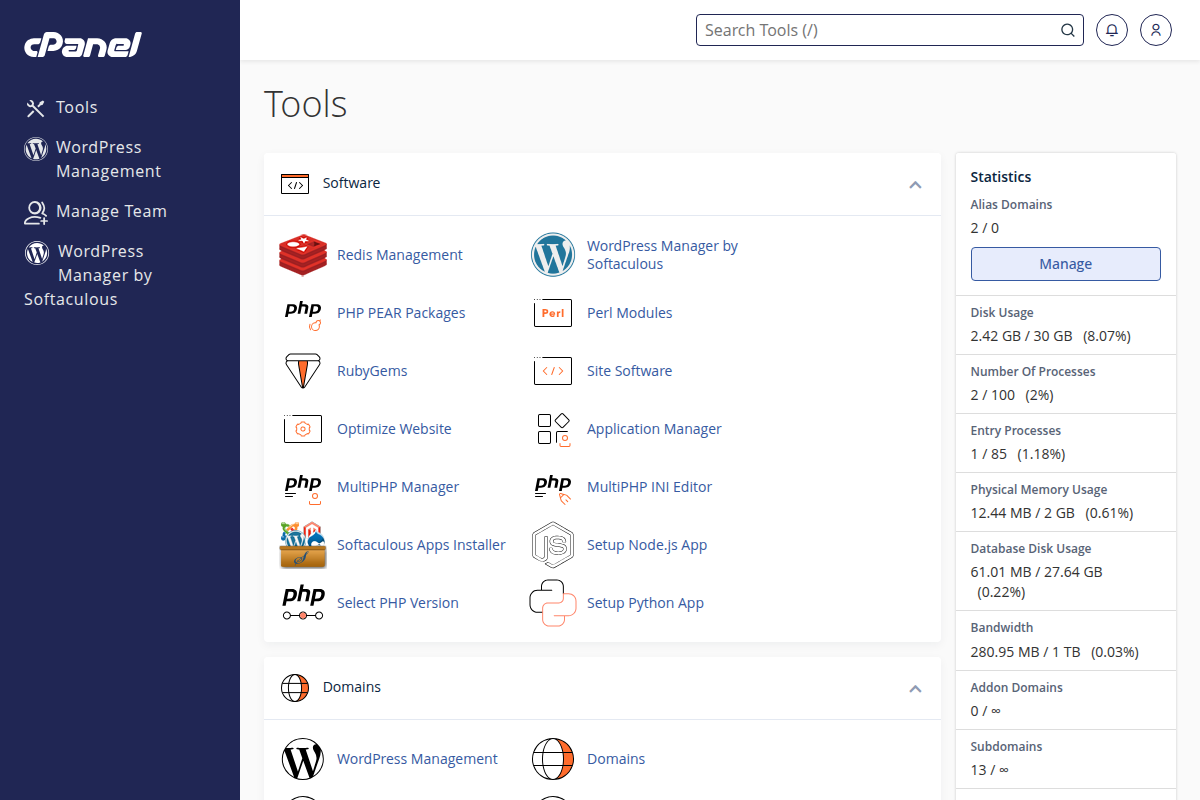
Find MultiPHP Manager in the Software section of cPanel