For OpenCart shops

Take card payments on OpenCart, and know exactly where your data goes.

Card Payments + Buy Now puts card, Apple Pay and Google Pay on your checkout through your own Stripe account, adds a one-tap Buy now button to your product pages, lets customers set up repeat orders, and lets you refund from the order page. It talks to Stripe and to nobody else.

Try it first on our demo shop: pay with the test card 4242 4242 4242 4242, any future date and any three digits. Nothing is charged.

£59 once, with a year of updates and help. Included at no extra cost when your shop is hosted with us, with updates for as long as you stay.

Used every day by Best Immune Best Immune is a Gravity Host customer, and their shop takes every payment through it. See it working on shop.bestimmuneint.com.

Repeat orders

Your customers set it and forget it. You just see another order.

Like a subscription, without anything new to learn. A customer who loves a product picks "every month" (or every 2 or 3) right in the Buy now box, and it simply turns up.

For your customer

Their favourite product arrives every month, or however often they chose, on the card they already used. A reminder comes 3 days before each delivery, with a link to skip one, change how often or the card, pause or cancel. Signed-in customers see it all under My account, and Apple Pay shows them up front that it repeats.

For you

Each delivery is an ordinary OpenCart order, at that day's price, in your usual order list with your usual emails, so you pack it like any other. You choose which products offer it and how often. If something is out of stock, nothing is charged: it waits and you are told.

What it does

Everything a shop needs from Stripe, in one extension.

Cards and wallets

Visa, Mastercard and Amex, Apple Pay, Google Pay and Link, with 3D Secure handled for you. Returning customers can save a card and pay in one click next time.

One-tap Buy now

An Apple Pay or Google Pay button on product pages and the basket. The shopper picks delivery in the payment sheet and the order is in your admin seconds later.

Refunds from the order

Full or part refunds from a Stripe tab on the order page, with the order status and history updated for you. Orders from your old plugin can be refunded the same way.

Looks like your shop

The card form takes its colours and fonts from your theme, in light and dark mode, on phones and desktops.

Speaks your customer's language

The checkout follows the shop's language, with the extension's own words in English, German, French, Dutch, Polish, Italian, Spanish and Brazilian Portuguese.

Ready for the newest PHP

Runs on PHP 7.4 through PHP 8.5, so moving your server to a current PHP never takes your checkout down.

The card form at checkout: card number, expiry, security code, country, and a Pay now button
The card form at checkout, in the shop's own colours.

Buy now

Fewer steps between "I want it" and "paid".

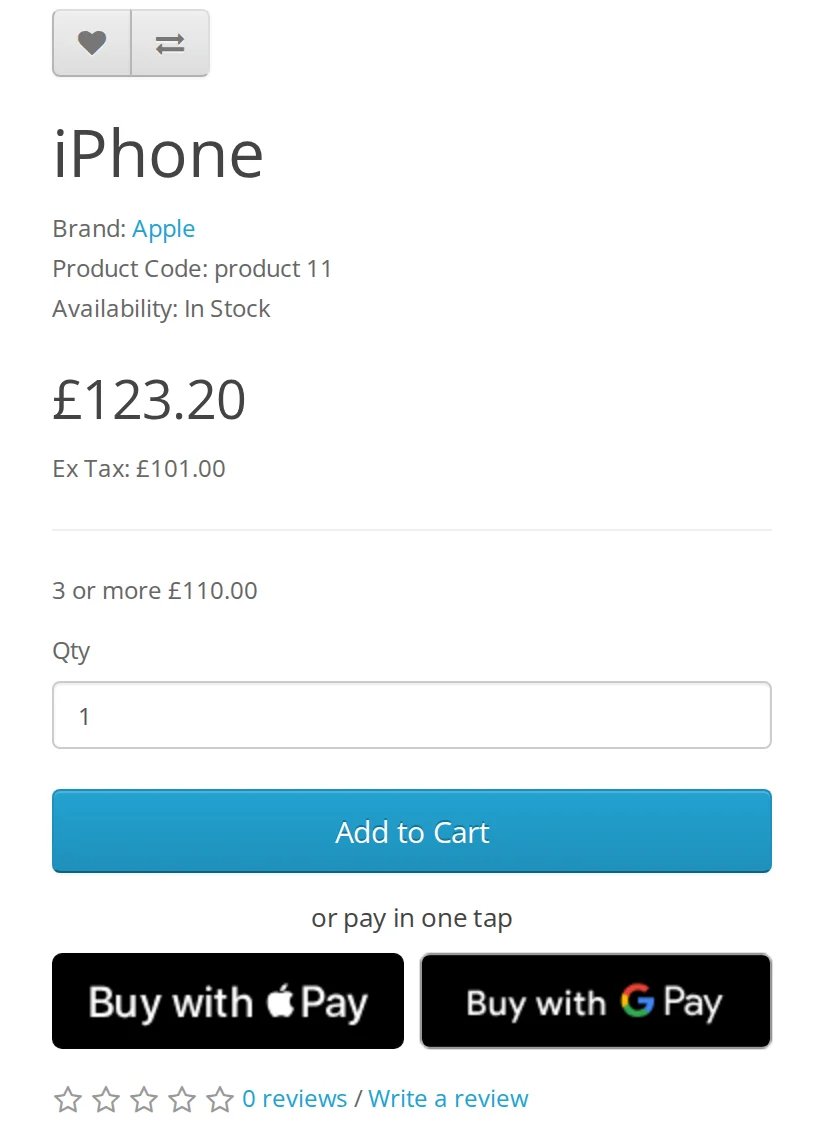
Shoppers on a phone can pay from the product page with Apple Pay or Google Pay, choosing delivery inside the payment sheet. No account, no forms, no basket to fill first.

The button sits under your own Add to Cart button, waits until it is ready before it shows, and only appears where the shopper's device supports it.

A product page with Add to Cart and, under it, Buy with Apple Pay and Buy with Google Pay buttons
Buy now sits under your own Add to Cart button.
The extension's settings in the OpenCart admin: a Restricted key box and a Create the key in Stripe button
One button opens Stripe with the right permissions already ticked.

Why we built it

We looked inside a paid Stripe plugin on a client's shop.

It worked, so nobody had looked. On every checkout it sent the shop's licence key and address, the order total and every item in the basket to its developer's own server. The details were lightly scrambled, which hides nothing from whoever wrote the code. That server then told the shop how much to charge, over a connection with its security checks switched off.

We did not find customer names or card details going anywhere, and it looked like copy protection rather than anything worse. It still meant someone else could see what the shop sold and could, in principle, change what its customers paid. That was enough for us to replace it, and then to build the replacement properly.

It is built to follow Stripe's and OpenCart's guidelines, and privacy and consumer law in the UK, the EU, the US and elsewhere: your sales data stays between your shop and Stripe.

Your shop Payments Someone else's server
Your shop talks to Stripe. Nobody else is on the line.

So this one is built the other way round

  • No calls home. The extension talks to Stripe and nobody else. Updates are checked only when you press the button.
  • Your server sets the price. Amounts are worked out by your own shop, and Stripe confirms every payment before an order is marked paid.
  • Card details never touch your shop. They go straight from the shopper to Stripe.
  • A restricted key, not your master key. Stripe has asked plugins to work this way since September 2024; the settings page creates the key for you.
  • Open code. Nothing scrambled or encrypted, so you or your developer can read every line.

Price

Pay once. Or get it with your hosting.

With Gravity Host OpenCart hosting

Included. The extension and every update for as long as your shop is hosted with us, and we will install it with you.

Buy web hosting

On its own

£59 once. Yours to keep, with a year of updates and help. Renew for another year whenever you want the latest version.

Ask us to buy it

What's new

Version 1.0.1, 30 October 2026

  • Repeat orders can never be charged twice, even if the hourly job is stopped half way or Stripe is slow to answer: the next run asks Stripe what happened and finishes that order.
  • If a product is taken off sale or can no longer be delivered, the customer is told the order could not be made, not that their card failed, and you get an email once.
  • Changes a customer makes while a delivery is going out (pause, cancel, a new card, how often) are kept. One repeat order with a problem no longer holds up the others.
  • A new card only starts a repeat order again if failed payments paused it; one the customer paused stays paused. Skipping a delivery that kept failing starts afresh.
  • Shops with more than one store: each delivery is made in the store it was first ordered in.
  • Reminders are not sent while an order waits for stock, and names with an apostrophe or "&" show correctly in emails.

Updating keeps your settings: upload the new zip in Extensions > Installer.

Before you buy

The questions people ask.

Which OpenCart versions does it work with?

OpenCart 3.0, on PHP 7.4 right up to PHP 8.5. It installs through the normal Extension Installer, with no files to edit by hand.

Do I need a Stripe account?

Yes. Payments go into your own Stripe account and Stripe pays them out to your bank, on Stripe's usual fees. We never see or hold your money. The settings page creates the restricted key it needs for you, so you never paste your full secret key into the shop.

Does it send anything to you?

No. The extension talks to Stripe and to nobody else: no licence server, no usage counting, no tracking. The one exception is a "Check for updates" button in its settings, which asks us which version is newest only when you press it. You can check this yourself, because the code is not scrambled or encrypted.

What do I get for the price?

The extension to keep and use on your shop, with a year of updates and help included. After that it keeps working as it is; renewing simply brings another year of updates and help.

Is it really free with your hosting?

Yes. If your OpenCart shop is hosted with us, the extension and all its updates are included for as long as you stay. We install it with you if you would like.

Can customers order again automatically?

Yes. Customers can choose a repeat order every 1, 2 or 3 months right in the Buy now box. Each delivery is a normal order at that day's price, on the card they used, with a reminder email before it goes out and a link to skip, pause or cancel. You choose which products offer it.

Can I move from another Stripe plugin?

Yes, without losing anything. It uses the same Stripe account, so customers' saved cards carry on working, and orders taken by your old plugin can still be refunded from the order page.

What languages does it speak?

The checkout follows your shop's language, and its own words come in English, German, French, Dutch, Polish, Italian, Spanish and Brazilian Portuguese. The card form itself is translated by Stripe into many more.