Choosing a booking system for your salon, barbershop or clinic
A booking system lets clients book online at any hour, reminds them before they come and keeps every diary in the business straight. This guide covers what a good one does, seven questions to ask before you pay for one, and how it works with your website.
It is written for salons, barbers, clinics, physios, therapists and studios. We also say which one we would choose: go straight to our recommendation.
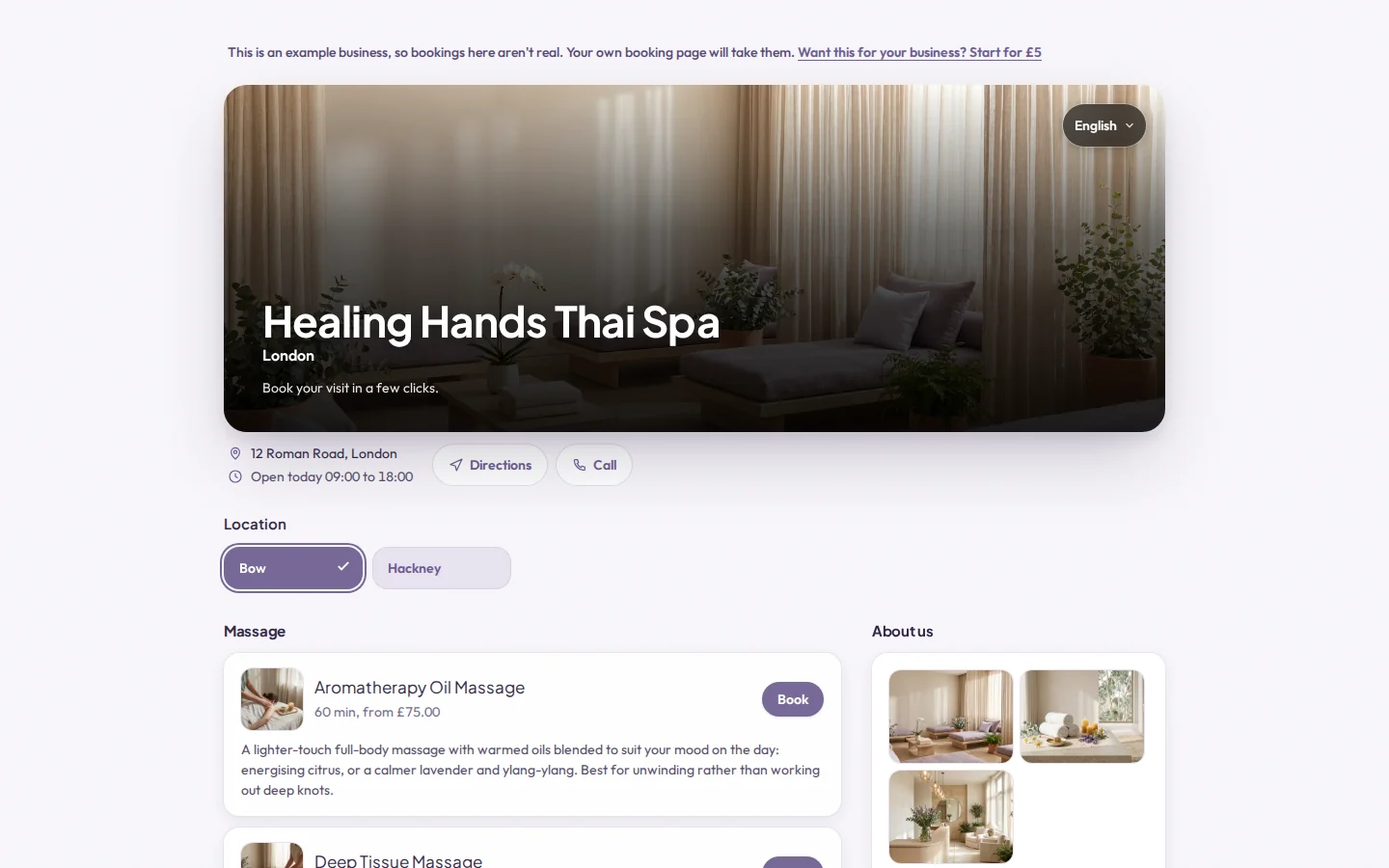
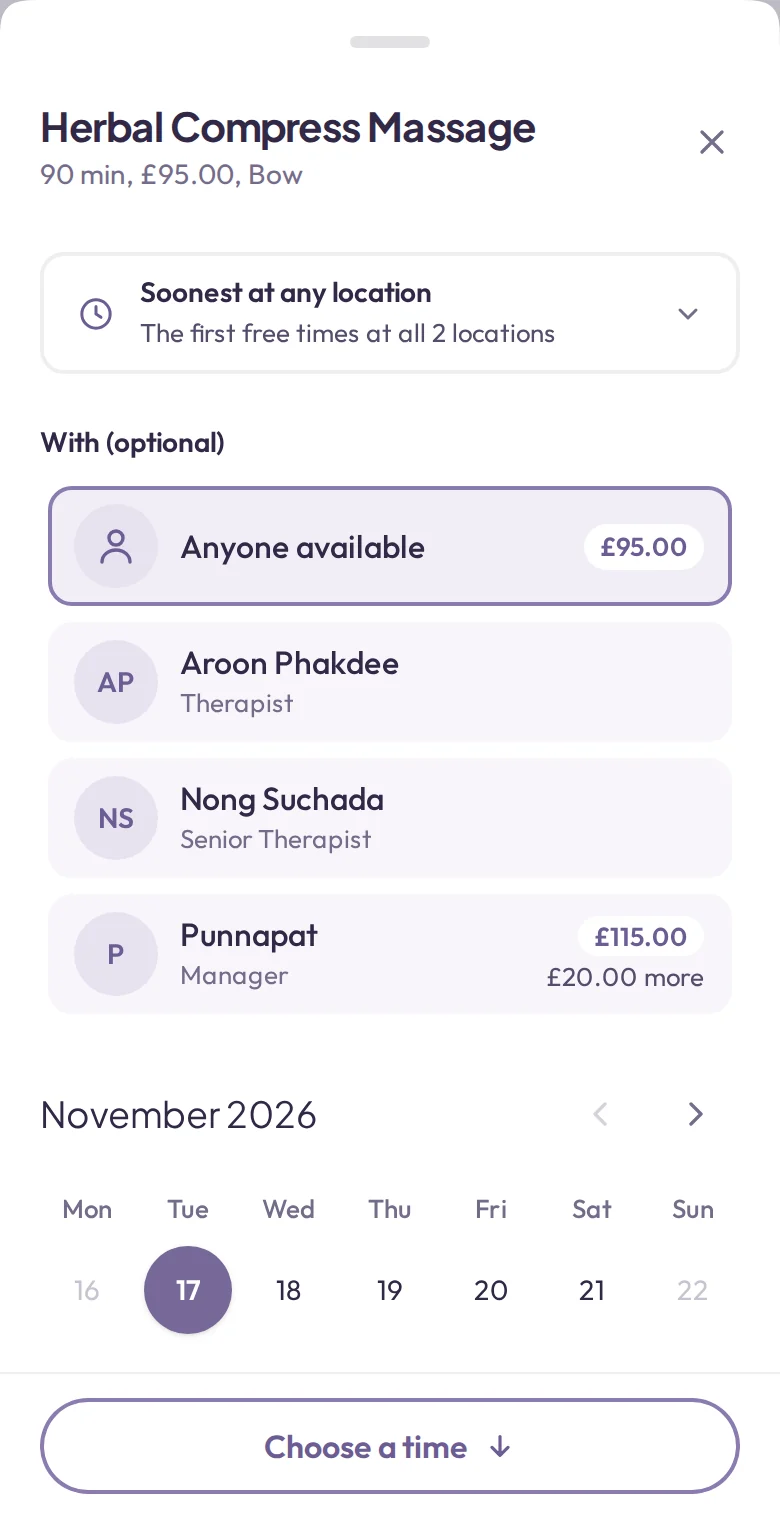
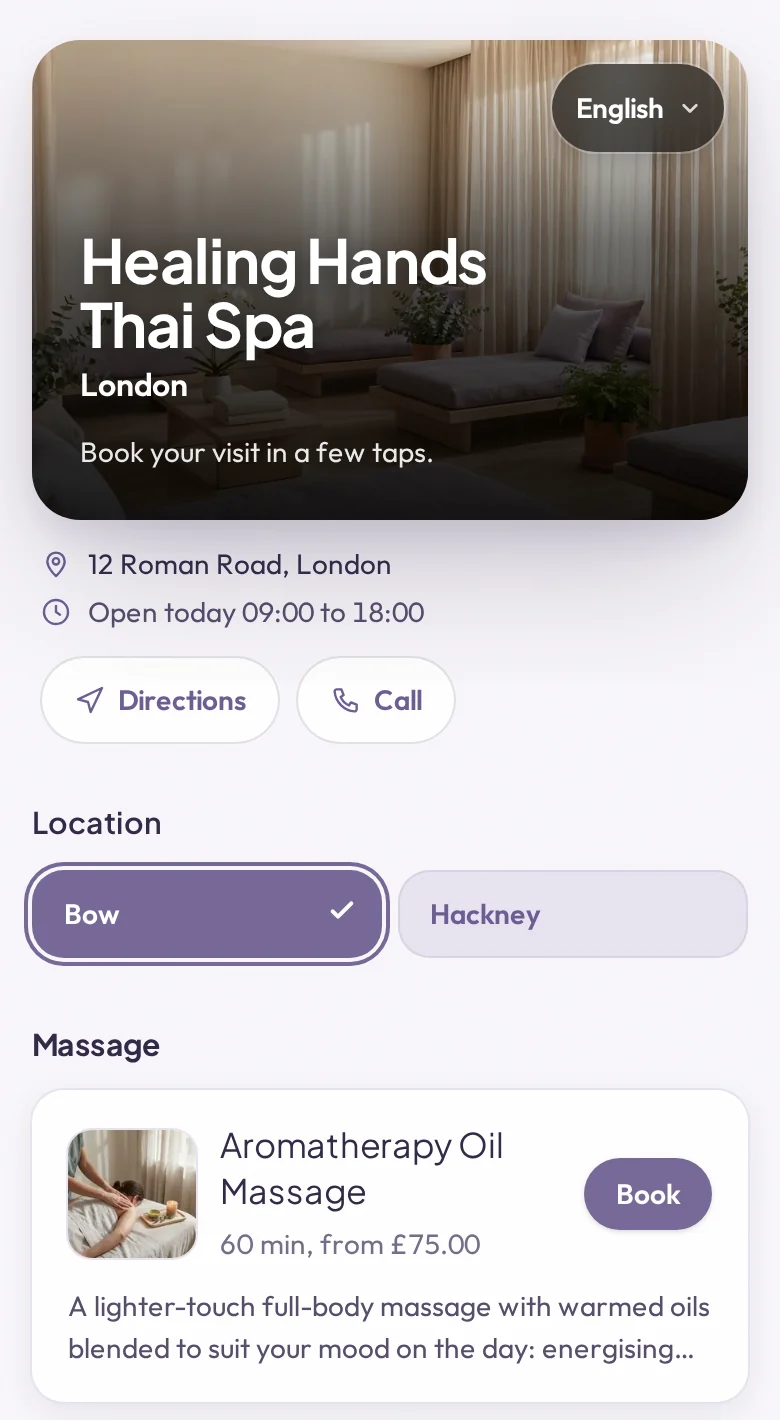
The screens on this page are Appoint Me's example spa, Healing Hands. It is a made-up business, and you can try its booking page yourself.
What a booking system does, one appointment at a time
The clearest way to see what you are paying for is to follow a single booking from the moment a client thinks of you to the moment they leave.
-
Sunday, 22:40
A client books while you are closed
Online booking is open at any hour. The client picks a service, picks who with, and sees only the times that are really free, so two people can never be given the same slot. Nobody has to wait for you to answer the phone or a message.
-
A minute later
They pay a deposit, if you ask for one
A deposit by card when the booking is made is the fairest protection against an empty chair. You decide whether to ask for one and how much. The confirmation goes out by itself, with the date, the time and your address.
-
The day before
A reminder goes without you sending it
Many missed appointments are simply forgotten. A reminder the day before brings people back to their diary, and a simple way to move or cancel means you hear about it while there is still time to fill the gap.
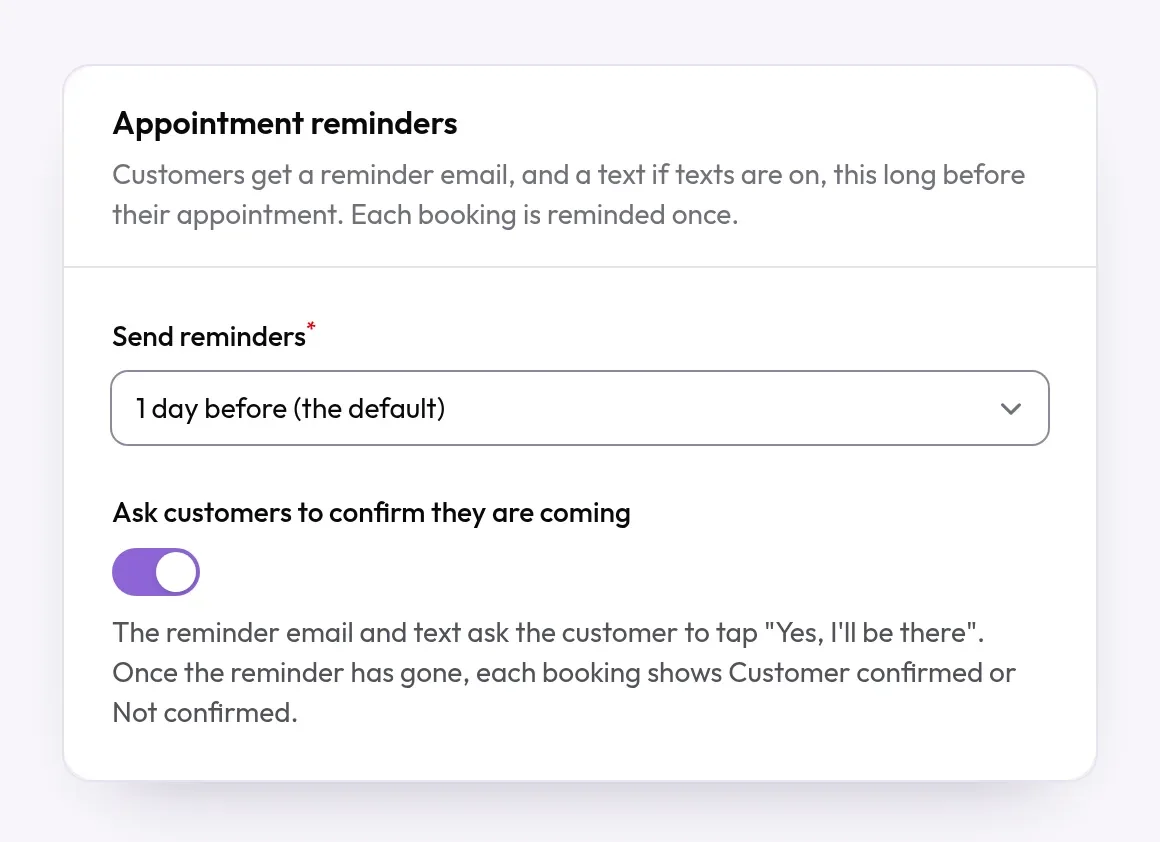
You set a reminder once and it goes out for every booking. -
On the day
Everyone's diary agrees
Each person on the team has their own column and their own working hours. A booking made online, one taken over the phone and a walk-in all land in the same diary, on every screen in the building.
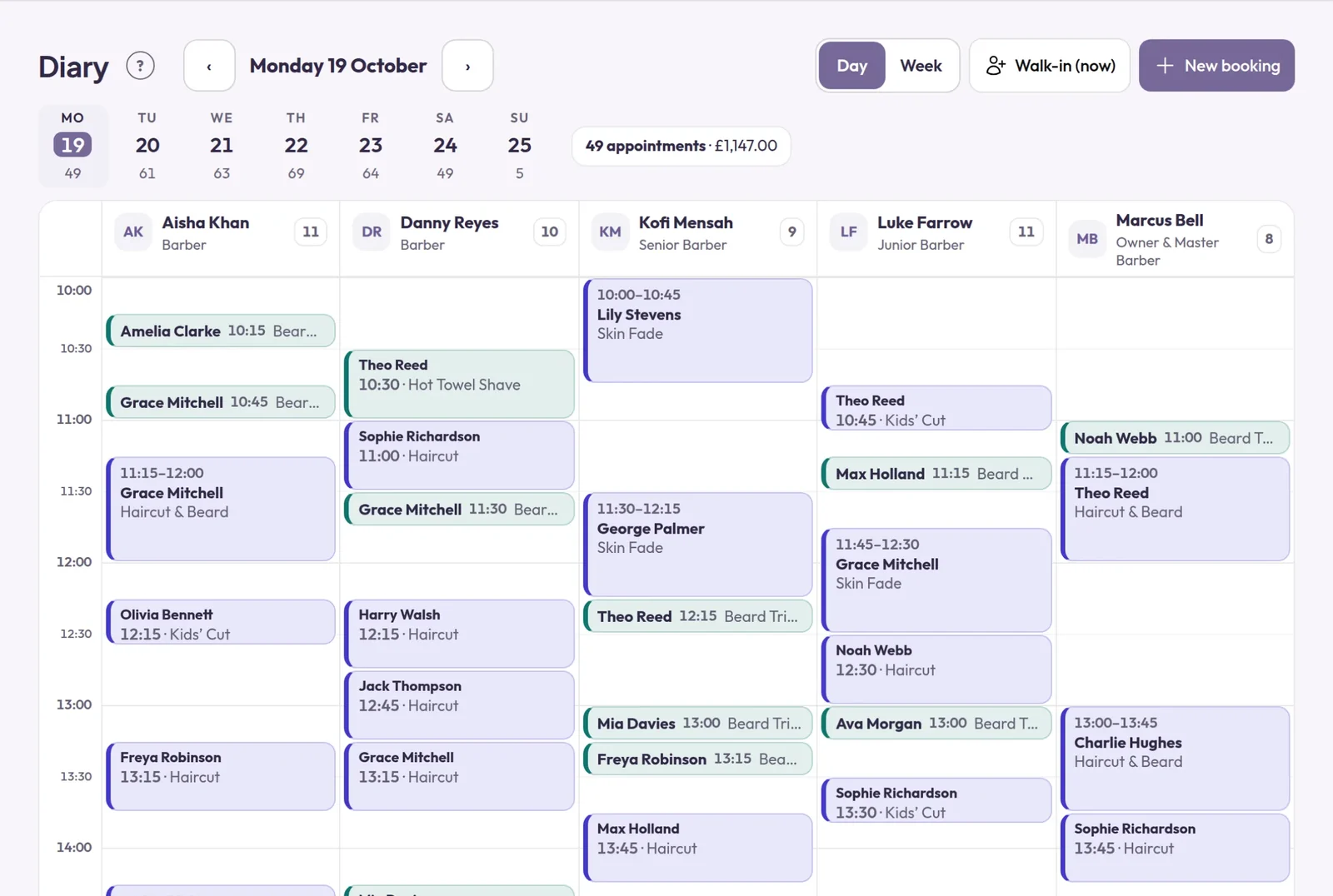
One day in a five-chair barbershop, a column for each barber. -
Afterwards
The client is on your list, not lost in a notebook
Their visits and what they had are kept with their name, so the next booking takes seconds, and you can see who has not been in for a while.
How to choose: seven questions to ask
Booking systems charge in different ways and suit different kinds of business. None of the ways is wrong. These questions show which one fits yours.

- What will it cost in your busiest month?Some charge a flat monthly fee, some charge for each member of staff, and some take a commission on bookings. Work each one out for your own team and your own December, not for the smallest example on the price page.
- Whose page do your clients land on?Some systems are also a marketplace, which can bring you new people and also shows them other businesses. Others give you a page with only your business on it. Decide which you want.
- Can a client book in a few taps on a phone?Open a demo and book as a client would. If it takes you more than a minute, it will take them longer.
- Does it take deposits, and where does the money go?Ask whether a deposit is paid into your own account, how soon, and what happens to it when a client cancels in good time.
- What do reminders cost?Email reminders are often included. Texts and WhatsApp messages usually cost a few pence each, so ask for the price of one message, not a bundle.
- Does it fit the way you work?Think of the awkward cases: two services in one visit, a room as well as a person, a class with ten places, a second location, staff who work different days.
- Who helps when you are stuck, and who moves your diary across?Ask whether a person replies, and whether they will bring your clients and future bookings over from the system you use now.
How it works with your website
Your website is where people find you. Your booking page is where they book. The two are joined by one button, and it belongs on every page.
- On a Gravity Host website: every design in our Website Builder has a booking setting. Paste the web address of your booking page and your site shows a button that opens it.
- On WordPress or any other site: add the same address as a button near the top of the page and as a link in the menu.
- Everywhere else people find you: put the same link on your Google listing and your social media pages.
- At your own address: with a website and email at your own domain name, your cards, your window and your listings all point to an address you own. If you ever change booking systems, you change one link and nothing else moves.

The one we would choose: Appoint Me
The Appoint Me booking system is our sister product, made by GK Tools, the company behind Gravity Host. We recommend it because we know how it is built and looked after, and because it answers the seven questions above well.
- A booking page with only your business on it. Appoint Me does not run a marketplace, so the people who book with you are never shown anyone else.
- Deposits go straight to you. They are paid by card into your own Stripe account.
- Confirmations and reminders by email are included. Texts, WhatsApp messages and marketing emails are optional extras that you choose.
- One diary, a column for each person. Staff and bookings are unlimited, and each booking can appear in that person's Google or Microsoft 365 calendar.
- They move your data for you. Send the exports from your old system and the Appoint Me team moves your clients, diary and history across.
- A real person replies when you ask for help.
What it costs
£50 a month per business, plus £40 a month for each extra location, with 0% commission. Everything you need is in that one flat price.
Founding offer for the first 100 businesses: your first 6 months for a one-off £5, then £50 a month. If it is not right in the first 30 days, you get your £5 back.
Appoint Me is also priced in dollars ($75 and $60) and euros (€63 and €50), and it works in 23 languages.
Prices and features read on appointme.com on 17 November 2026. Appoint Me has its own account and its own bill, separate from your hosting.
Questions about booking systems
What is a booking system?
It is software that lets your clients book an appointment online, at any hour, from times that are really free. It keeps one diary for the whole business, sends confirmations and reminders by itself, and can take a deposit when the booking is made.
Do I need a website as well as a booking system?
Not to take bookings: a booking page is enough for that. A website does the other jobs. It is where people find your prices, your opening hours, your work and how to reach you, at an address you own, and it gives you email at your own name. Most businesses end up with both, joined by a Book button.
Can I put a booking button on my Gravity Host website?
Yes. Every design in our Website Builder has a booking setting: paste the web address of your booking page and your site shows a button that opens it. On WordPress or a site built another way, add the same address as a button or a menu link.
Will a booking system stop no-shows?
Nothing stops them altogether. A reminder the day before helps people remember, a simple way to move or cancel means you hear in time to fill the gap, and a deposit gives people a reason to turn up.
How much does Appoint Me cost?
On 17 November 2026 its pricing page said £50 a month per business, plus £40 a month for each extra location, with 0% commission. Its founding offer for the first 100 businesses is the first 6 months for a one-off £5, then £50 a month. Texts, WhatsApp messages and marketing emails are optional extras.
Can I move from the booking system I use now?
Usually, yes. Ask your current system for an export of your clients and bookings. With Appoint Me you send those exports and its team moves your clients, diary and history across for you.
Is Appoint Me part of Gravity Host?
No. They are separate products from the same company, each with its own account and its own bill. You can use either one without the other.
Need the website to go with it?
Web hosting from Gravity Host comes with the Website Builder and email at your own domain name. The order page shows the price before you pay.